
It is hard to stop spam email entirely but you can filter it, discard it, deliver it to the selected folder, etc.
How to Create a User Level Email Filter?
1. Log in to your cPanel account.
2. In the Email section, click on Email Filters.
3. Under Filters by Users, you can see all existing email accounts. Click on Manage Filters next to the appropriate one. 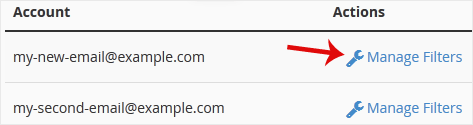
4. Click on Create a New Filter.
5. Enter a name for the filter in the Filter Name input box.
6. You can filter email with many options in the filter rules. If you want to deal with an email containing a word such as Lottery or other words, select Body in the first list box and select Contains in the second one.
7. From the Actions drop-down menu, select Discard Message.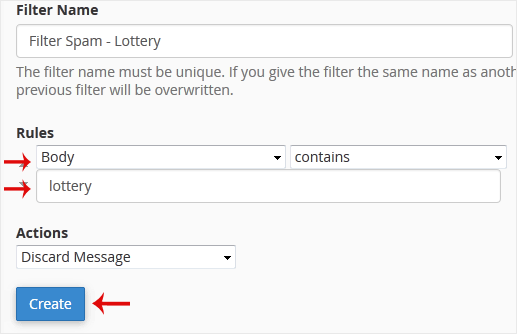
8. Now click on Create.
Categories
Backup/Restore
5
Cloudflare (cPanel)
9
CloudLinux (cPanel)
10
Cpanel
54
cPanel - Control Panel
24
Databases
11
DirectAdmin
48
DNS - Nameservers
6
Domain Management
10
Email
17
FTP
9
Installing a Control Panel
6
Mail Filters & SPAM
8
Mobile
11
Others
3
PayPal
7
Plesk
47
Proxmox
1
Reseller Hosting
3
Security
10
SiteWorx (Control Panel)
58
Softaculous
69
SolusVM
18
SSL
5
Virtualizor
19
WHM
18
WordPress
18
Categories
Tag Cloud
adddomain
backups
Cpanel
demo import
DNS
domains
increase memory limit
Let's Encrypt
Let's Encrypt™ SSL
Nameservers
password
php ini
Private NameServers
Redirect
Reseller Hosting
Search Console
SSL
support
supportpin
theme
whm
woodmart theme error
wp error fix
wp theme demo
اضافة دومين
اعادة توجيه
توجيه الدومين لشهادة الامان
حجز استضافة
خطة استضافة
ربط الدومين بالاستضافة
سيو
شهادة SSL
شهادة الامان
طريقة الدفع
محركات بحث
مشرفي جوجل
نيم سيرفر
How to Create a "User Level Email Filter" in cPanel Print
- 0
Was this answer helpful?
Related Articles
How to Enable BoxTrapper in cPanel
BoxTrapper requires all email senders not on your Whitelist to respond to verification emails. It...
How to Edit an Account Level/Global Email Filter in cPanel
1. Log in to your cPanel account.2. In the Email section, click on Global Email Filters. 3. Under...
How to Edit "User Level Email Filter" in cPanel
1. Log in to your cPanel account. 2. In the Email section, click on Email Filters. 3. Under...
How to Enable Apache SpamAssassin and SpamBox in cPanel
Apache SpamAssassin is a mail filter that identifies spam. An intelligent email filter uses...
How to Delete "User Level Email Filter" in cPanel
1. Log in to your cPanel account.
2. In the Email section, click on Email Filters. 3. Under...
Tag Cloud
adddomain
backups
Cpanel
demo import
DNS
domains
increase memory limit
Let's Encrypt
Let's Encrypt™ SSL
Nameservers
password
php ini
Private NameServers
Redirect
Reseller Hosting
Search Console
SSL
support
supportpin
theme
whm
woodmart theme error
wp error fix
wp theme demo
اضافة دومين
اعادة توجيه
توجيه الدومين لشهادة الامان
حجز استضافة
خطة استضافة
ربط الدومين بالاستضافة
سيو
شهادة SSL
شهادة الامان
طريقة الدفع
محركات بحث
مشرفي جوجل
نيم سيرفر
