
You can find our nameservers in your hosting welcome email. You need to update your domain nameservers to our nameservers.
If your domain is registered on 123-Reg, you should follow this tutorial to update your domain's Nameservers.
1. Open the 123-reg.co.uk website and click on Control Panel. It will show you a login form.
2. Enter the username and password of your 123-reg account and click on Log-in.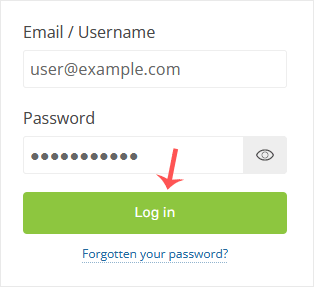
3. After a successful login, select the appropriate domain from the drop-down list and then click on Manage.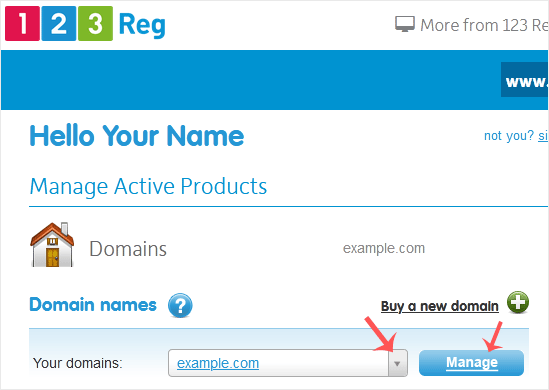
4. Scroll down to the Advanced domain settings and click on Change Nameservers (DNS).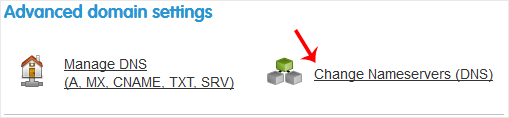
5. Enter your nameservers in the text fields and click on Update.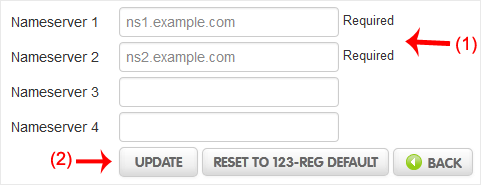
You will see a success message.
Note: It may take anywhere from 12 to 24 hours for the changes to take effect worldwide.
Categories
Backup/Restore
5
Cloudflare (cPanel)
9
CloudLinux (cPanel)
10
Cpanel
54
cPanel - Control Panel
24
Databases
11
DirectAdmin
48
DNS - Nameservers
6
Domain Management
10
Email
17
FTP
9
Installing a Control Panel
6
Mail Filters & SPAM
8
Mobile
11
Others
3
PayPal
7
Plesk
47
Proxmox
1
Reseller Hosting
3
Security
10
SiteWorx (Control Panel)
58
Softaculous
69
SolusVM
18
SSL
5
Virtualizor
19
WHM
18
WordPress
18
Categories
Tag Cloud
adddomain
backups
Cpanel
demo import
DNS
domains
increase memory limit
Let's Encrypt
Let's Encrypt™ SSL
Nameservers
password
php ini
Private NameServers
Redirect
Reseller Hosting
Search Console
SSL
support
supportpin
theme
whm
woodmart theme error
wp error fix
wp theme demo
اضافة دومين
اعادة توجيه
توجيه الدومين لشهادة الامان
حجز استضافة
خطة استضافة
ربط الدومين بالاستضافة
سيو
شهادة SSL
شهادة الامان
طريقة الدفع
محركات بحث
مشرفي جوجل
نيم سيرفر
How to Update the DNS Nameservers at 123-Reg Print
- 0
Was this answer helpful?
Related Articles
How to Update the DNS Nameservers at Name.com
You can find our nameservers in your hosting welcome email. You need to update your domain...
How to Update the DNS Nameservers at NetEarthOne or LogicBoxes-Based Registrars
You can find our nameservers in your hosting welcome email. You need to update your domain...
How to Update the DNS Nameservers at GoDaddy
You can find our nameservers in your hosting welcome email. You need to update your domain...
How to Update the DNS Nameservers at DynaDot
You can find our nameservers in your hosting welcome email. You need to update your domain...
How to Update the DNS Nameservers at NameCheap.com
You can find our nameservers in your hosting welcome email. You need to update your domain...
Tag Cloud
adddomain
backups
Cpanel
demo import
DNS
domains
increase memory limit
Let's Encrypt
Let's Encrypt™ SSL
Nameservers
password
php ini
Private NameServers
Redirect
Reseller Hosting
Search Console
SSL
support
supportpin
theme
whm
woodmart theme error
wp error fix
wp theme demo
اضافة دومين
اعادة توجيه
توجيه الدومين لشهادة الامان
حجز استضافة
خطة استضافة
ربط الدومين بالاستضافة
سيو
شهادة SSL
شهادة الامان
طريقة الدفع
محركات بحث
مشرفي جوجل
نيم سيرفر
