
If you send an email via iOS, a signature will be automatically added in your reply, such as Sent from my iPhone. But do you know that you can customize this signature as well?
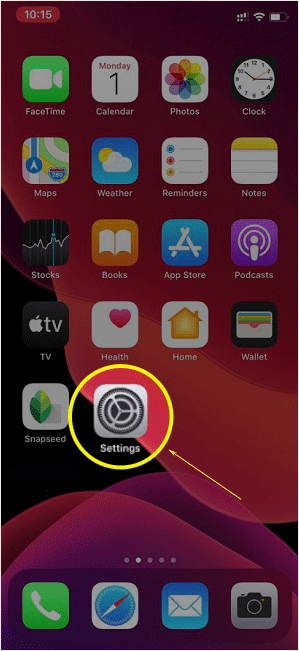
1. Open the main screen of your Apple Mobile and click on the Settings icon.
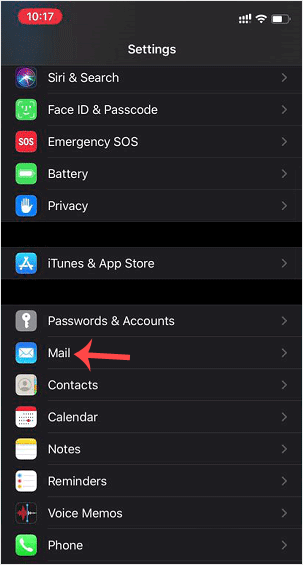
2. Scroll down and tap on Mail.
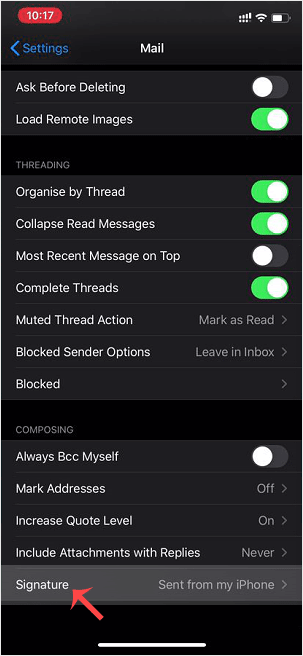
3. Now tap on Signature.
4. Customize your signature.
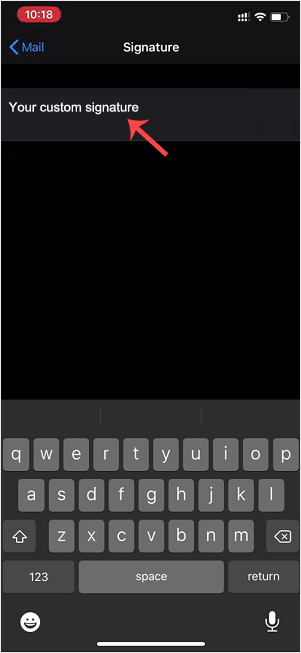
After changing it, your iOS will send your customized signature instead of the default signature.
Categories
Backup/Restore
5
Cloudflare (cPanel)
9
CloudLinux (cPanel)
10
Cpanel
54
cPanel - Control Panel
24
Databases
11
DirectAdmin
48
DNS - Nameservers
6
Domain Management
10
Email
17
FTP
9
Installing a Control Panel
6
Mail Filters & SPAM
8
Mobile
11
Others
3
PayPal
7
Plesk
47
Proxmox
1
Reseller Hosting
3
Security
10
SiteWorx (Control Panel)
58
Softaculous
69
SolusVM
18
SSL
5
Virtualizor
19
WHM
18
WordPress
18
Categories
Tag Cloud
adddomain
backups
Cpanel
demo import
DNS
domains
increase memory limit
Let's Encrypt
Let's Encrypt™ SSL
Nameservers
password
php ini
Private NameServers
Redirect
Reseller Hosting
Search Console
SSL
support
supportpin
theme
whm
woodmart theme error
wp error fix
wp theme demo
اضافة دومين
اعادة توجيه
توجيه الدومين لشهادة الامان
حجز استضافة
خطة استضافة
ربط الدومين بالاستضافة
سيو
شهادة SSL
شهادة الامان
طريقة الدفع
محركات بحث
مشرفي جوجل
نيم سيرفر
How to Change the Signature of an Apple/iOS (Sent From My iPhone) Print
- 0
Was this answer helpful?
Related Articles
How to Add a cPanel Email Account on Apple/iOS
You can add a cPanel email account to your Apple IOS mobile and be able to automatically check...
How to Check/Fetch an Email on Apple/iOS
You can set your email for automatic syncing. However, should you want to check for new emails...
How to Automatically Sync or Fetch a cPanel email on Apple/iOS
You can set your email for automatic syncing. It means that if you receive new mail in your...
Tag Cloud
adddomain
backups
Cpanel
demo import
DNS
domains
increase memory limit
Let's Encrypt
Let's Encrypt™ SSL
Nameservers
password
php ini
Private NameServers
Redirect
Reseller Hosting
Search Console
SSL
support
supportpin
theme
whm
woodmart theme error
wp error fix
wp theme demo
اضافة دومين
اعادة توجيه
توجيه الدومين لشهادة الامان
حجز استضافة
خطة استضافة
ربط الدومين بالاستضافة
سيو
شهادة SSL
شهادة الامان
طريقة الدفع
محركات بحث
مشرفي جوجل
نيم سيرفر
