Skip to content
BLACK FRIDAY Mega Sale — Save up to 85% OFF
01d : 23h : 59m : 59s
Shop Deals

How to Check for New Email in Mozilla Thunderbird Print

  • 0

Thunderbird is an email client software. You can work with it in the following way.


1. Open Mozilla Thunderbird.
mozilla-thunderbird-cpanel-icon.gif


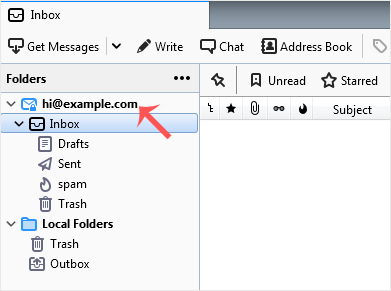
2. In the left panel, you can see a list of your email accounts. Double-click on Inbox or if it is hidden, click on your email. It will expand to show the inbox, the trash list, etc.
check-email-in-thunderbird.gif


Another option is to right-click on the email address and choose  "Get Messages".


Thunderbird also automatically checks email every 5 to 10 minutes. It also does that automatically whenever you open the program.


Was this answer helpful?

« Back

Take Your Host

Everything you came for.

Find your way to the right service or support channel. This is a navigation guide, not an AI chat or a support agent.

Do not enter passwords or payment details.

End this chat?

If you end the chat, the current conversation will be closed and a new empty chat will start.

TakeYourHost AIAsk about services, orders, domains, and support.
Screenshot preview Screenshot attached