
You can install a new WordPress theme without having any technical knowledge. It is so easy and automated.
1. Log in to the WordPress dashboard.
2. From the Dashboard menu, go to Appearance and click on Themes.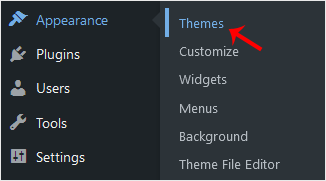
3. Click on Add New.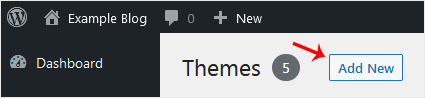
4. You can search for a theme using the search bar or browse the themes, choosing from Featured, Popular, and Latest.
5. Hover your mouse over the theme you like and choose Install.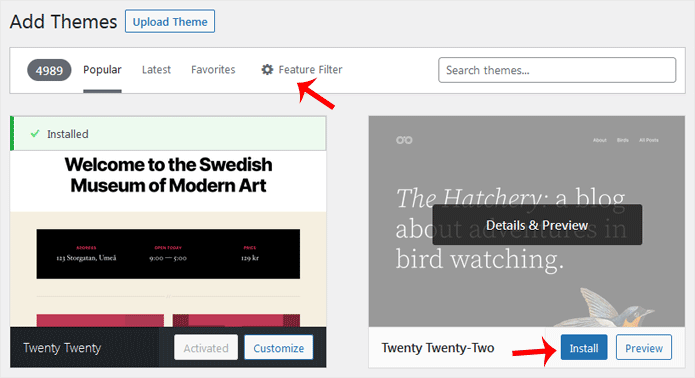
6. Click Activate on the newly installed theme.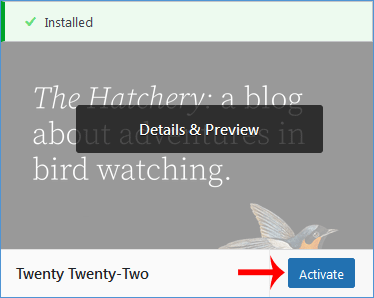
Congratulations, you have installed and activated a new theme on your blog.
Categories
Backup/Restore
5
Cloudflare (cPanel)
9
CloudLinux (cPanel)
10
Cpanel
54
cPanel - Control Panel
24
Databases
11
DirectAdmin
48
DNS - Nameservers
6
Domain Management
10
Email
17
FTP
9
Installing a Control Panel
6
Mail Filters & SPAM
8
Mobile
11
Others
3
PayPal
7
Plesk
47
Proxmox
1
Reseller Hosting
3
Security
10
SiteWorx (Control Panel)
58
Softaculous
69
SolusVM
18
SSL
5
Virtualizor
19
WHM
18
WordPress
18
Categories
Tag Cloud
adddomain
backups
Cpanel
demo import
DNS
domains
increase memory limit
Let's Encrypt
Let's Encrypt™ SSL
Nameservers
password
php ini
Private NameServers
Redirect
Reseller Hosting
Search Console
SSL
support
supportpin
theme
whm
woodmart theme error
wp error fix
wp theme demo
اضافة دومين
اعادة توجيه
توجيه الدومين لشهادة الامان
حجز استضافة
خطة استضافة
ربط الدومين بالاستضافة
سيو
شهادة SSL
شهادة الامان
طريقة الدفع
محركات بحث
مشرفي جوجل
نيم سيرفر
How to Install a New WordPress Theme Print
- 0
Was this answer helpful?
Related Articles
How to Access the WordPress Admin Dashboard
WordPress is an easy to work with CMS software. To access a WordPress account, please follow...
How to Remove Sample Comments and Posts From WordPress
You get sample comments and posts in a fresh WordPress install. You can easily remove them in the...
How to Write and Publish Your First Blog Post in WordPress
Writing your first blog post is a fascinating thing. Follow the steps below to do so in...
How to Remove a Post in WordPress
You can remove the published or draft post in WordPress.1. Log in to the WordPress dashboard.
2....
How to Bulk Delete Posts in WordPress
It is possible to delete posts in bulk using WordPress. You can also delete selected posts in...
Tag Cloud
adddomain
backups
Cpanel
demo import
DNS
domains
increase memory limit
Let's Encrypt
Let's Encrypt™ SSL
Nameservers
password
php ini
Private NameServers
Redirect
Reseller Hosting
Search Console
SSL
support
supportpin
theme
whm
woodmart theme error
wp error fix
wp theme demo
اضافة دومين
اعادة توجيه
توجيه الدومين لشهادة الامان
حجز استضافة
خطة استضافة
ربط الدومين بالاستضافة
سيو
شهادة SSL
شهادة الامان
طريقة الدفع
محركات بحث
مشرفي جوجل
نيم سيرفر
