Skip to content
BLACK FRIDAY Mega Sale — Save up to 85% OFF
01d : 23h : 59m : 59s
Shop Deals

How to Download a Dump of a Database in Plesk Print

  • 0


You can generate a backup of your database and download it to your computer using Plesk.


1. Log in to your Plesk account.

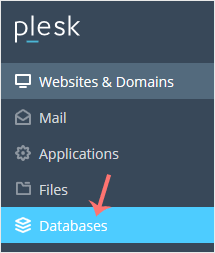
2. Click on Databases from the Sidebar Menu.
plesk-database-menu.gif


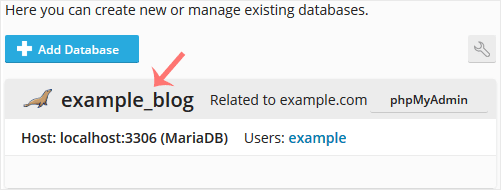
3. Choose the database you want to download from the list of databases.
plesk-database-list.gif


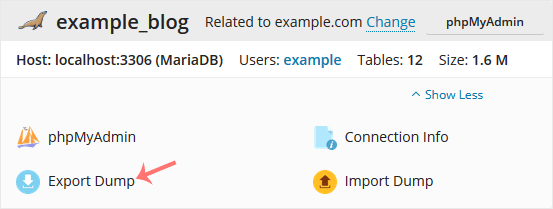
4. Proceed with Export Dump, and a popup box will appear.
plesk-export-database.gif


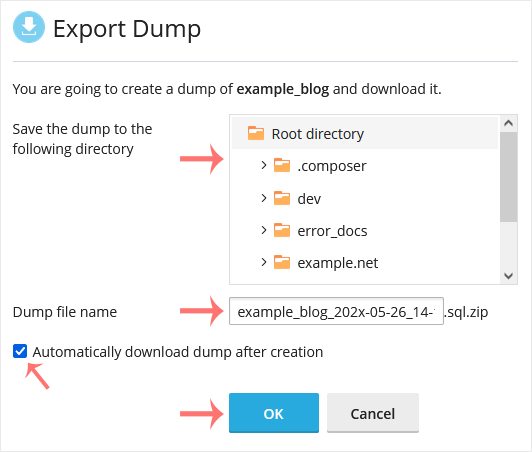
5. Choose the directory where your database dump will be saved. Checkmark Automatically download dump after creation, and confirm with OK.
plesk-database-export-dump.gif


Once a database dump is generated, your browser will prompt you to download it.


Was this answer helpful?

« Back

Take Your Host

Everything you came for.

Find your way to the right service or support channel. This is a navigation guide, not an AI chat or a support agent.

Do not enter passwords or payment details.

End this chat?

If you end the chat, the current conversation will be closed and a new empty chat will start.

TakeYourHost AIAsk about services, orders, domains, and support.
Screenshot preview Screenshot attached