Skip to content
BLACK FRIDAY Mega Sale — Save up to 85% OFF
01d : 23h : 59m : 59s
Shop Deals

How to Enable ionCube Loader Using CloudLinux Selector in cPanel Print

  • 0


You can use CloudLinux Selector to enable ionCube Loader in cPanel.


1. Log in to your cPanel account.

2. In the Software section, click on Select PHP Version.

cP-CL-Select-PHP-Version-icon.gif


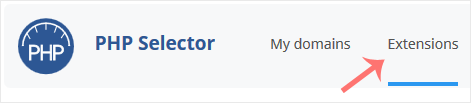
3. Click on the Extensions menu.

CL-extensions-tab-button.gif

Note: If the Extensions page shows an error related to the native PHP version, change it to a non-native version first.


4. Checkmark the ioncube_loader. Once enabled, it will display a success message.
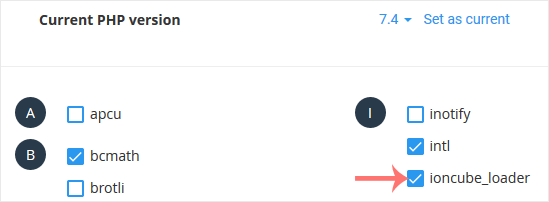
CL-enable-ioncubeloader.gif


The message will read that the module ionCube Loader is saved.

CL-ioncube-loader-enabled.gif


Was this answer helpful?

« Back

Take Your Host

Everything you came for.

Find your way to the right service or support channel. This is a navigation guide, not an AI chat or a support agent.

Do not enter passwords or payment details.

End this chat?

If you end the chat, the current conversation will be closed and a new empty chat will start.

TakeYourHost AIAsk about services, orders, domains, and support.
Screenshot preview Screenshot attached