Skip to content
BLACK FRIDAY Mega Sale — Save up to 85% OFF
01d : 23h : 59m : 59s
Shop Deals

How to Protect Website Images From Being Displayed at an External Website Print

  • 0

External websites may display your website images on their websites, thus stealing your bandwidth. You can prevent this with Hotlink Protection. 


1. Log in to your cPanel account.


2. In the Security section, click on HotLink Protection.

 

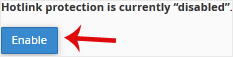
3. If it displays Hotlink protection is currently disabled, click on Enable.


How to Configure Hotlink Protection?
Under URLs to allow access, you can allow access to an external website or your website. For example, if you have a subdomain such as demo.example.com, you can add this website's URL to the list of allowed websites.


Was this answer helpful?

« Back

Take Your Host

Everything you came for.

Find your way to the right service or support channel. This is a navigation guide, not an AI chat or a support agent.

Do not enter passwords or payment details.

End this chat?

If you end the chat, the current conversation will be closed and a new empty chat will start.

TakeYourHost AIAsk about services, orders, domains, and support.
Screenshot preview Screenshot attached